Who I Am
With over 20 years of experience as a graphic design and DTP specialist, and an additional years in web development, I bring a unique blend of creativity and technical expertise to the table. My journey in the design world has equipped me with a deep understanding of the industry's demands, while my technical skills enable me to create custom scripts and plugins that enhance and streamline workflows in Adobe InDesign.

Services
Service Overview
Custom scripts and plugins for Adobe InDesign
I specialize in creating custom scripts and plugins for Adobe InDesign that automate repetitive tasks, extend software functionality, and optimize design workflows. My solutions are tailored to the individual needs of clients, resulting in significant time savings, increased efficiency, and improved project quality.
Service Offerings:
- Process Automation: Developing scripts that automate daily tasks, allowing you to focus on the creative aspects of your work.
- Functionality Extension: Creating plugins that add new features to Adobe InDesign, customized to the specific needs of your workflow.
- Data Integration: Connecting Adobe InDesign with external data sources, making it easier to work with large amounts of information.
- Data Extraction: Developing scripts for extracting data from multiple Adobe InDesign documents, facilitating easy online content placement and management of large publishing projects.
- Support and Updates: Providing continuous technical support and updates to ensure your tools are always up-to-date and functioning smoothly.
Trust my experience and expertise to transform your design processes and achieve better results in less time. Contact me to learn more about how I can help your business.
Benefits
Workflow Automation
I develop custom scripts that automate repetitive tasks, allowing your team to focus on the creative and strategic aspects of the project rather than routine operations.
Enhanced Productivity
By streamlining processes and reducing manual work, my solutions significantly increase productivity, saving you time and resources.
Tailored Solutions
Every script and plugin I create is tailored to your specific needs, ensuring seamless integration into your current workflows and tools.
Cost Efficiency
Automating time-consuming tasks reduces the need for manual intervention, leading to lower labor costs and faster project completion times.
Error Reduction
By automating complex tasks, I help reduce the potential for human error, improving the overall quality and consistency of your projects.
Script and plugin examples
Short description
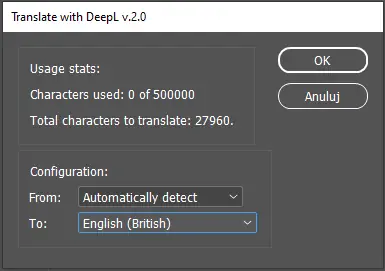
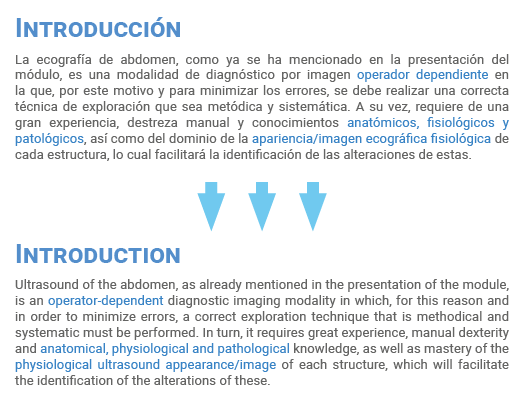
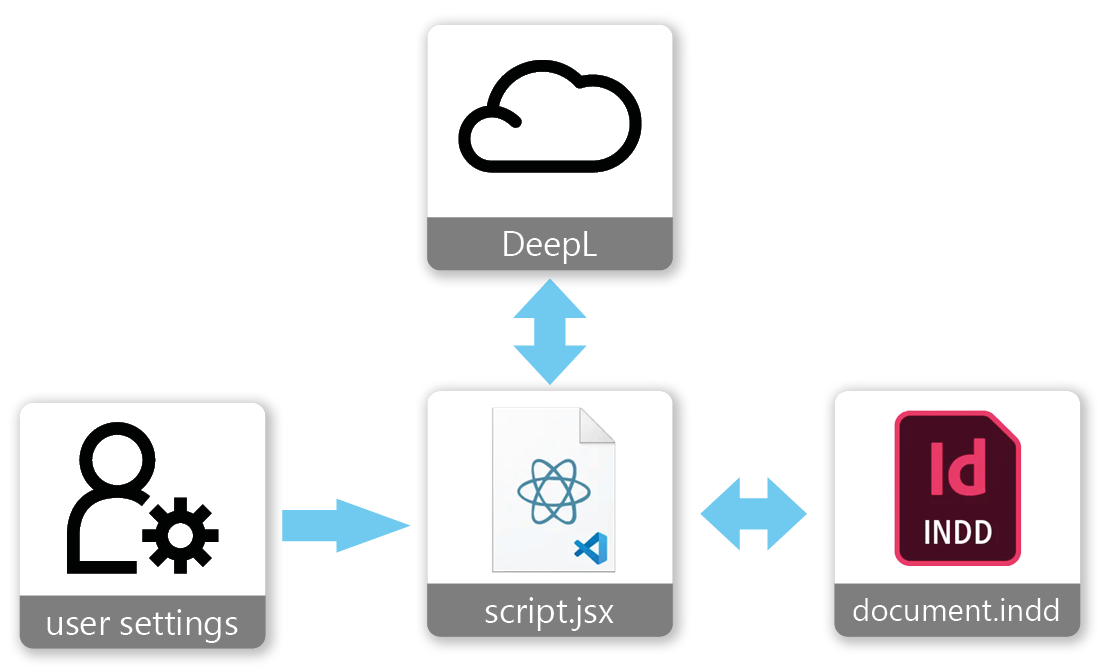
A script that translates the contents of an InDesign document using DeepL AI.
Features
- Translation of the entire InDesign document
- Preserves full text formatting
- Tokens needed/remaining info displayed
- Source and target language selection (automatic language detection available)
- Free and paid DeepL modes available
- Remembers last settings used
Problem:
Thomas needs to translate the content of multiple .indd documents using DeepL AI. He wants to preserve the text formatting applied in the documents. He also needs the ability to use both the free and paid modes of DeepL.
Input Data:
- .indd documents
Solution:
A script that, when run, translates the entire currently open InDesign document according to the specified parameters. The dialog box displays information about the currently available character limit (paid or free) and the estimated number of characters in the open document. The dialog box also allows the user to select the source and target languages.Delivered:
- Script
- A JSON configuration file containing default DeepL mode parameters and a placeholder for the user's DeepL API key.
Short description
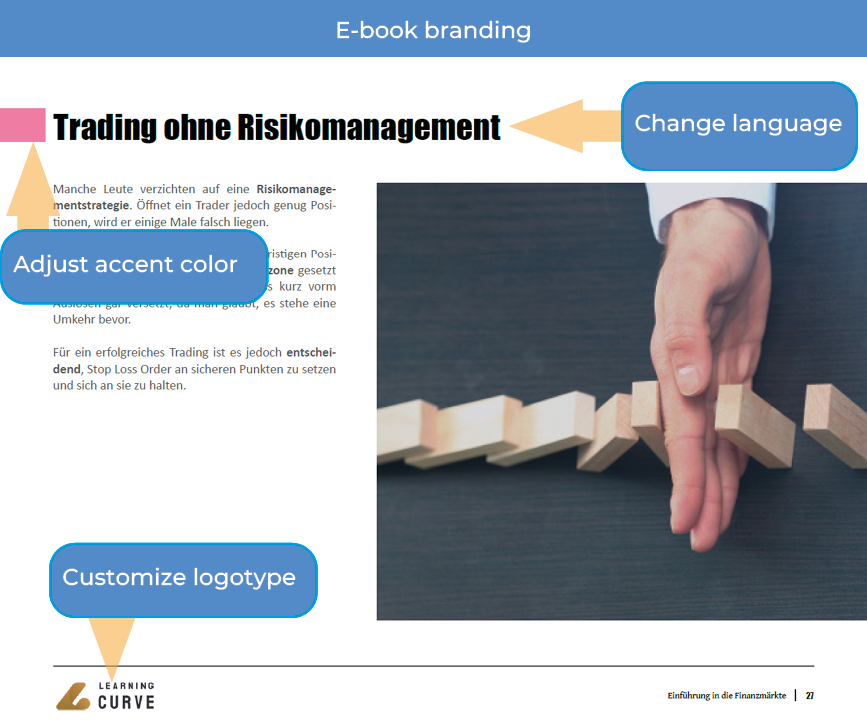
Customizes provided e-book templates with custom logotypes, language and accent color and generates them as active PDF.
Features
- light and dark background logotype customization
- produce multiple customizations in one go
- active table of contents in produced PDF files
Problem:
Irina prepared a set of 5 e-books in InDesign in different language versions placed on separate layers. She needed a quick way to personalize the entire set for a specific client. The personalization needed to include:
- Replacing the logo placed in various locations (logos come in 2 versions adjusted for light and dark backgrounds),
- Changing the language version of the document (by switching the visibility of the appropriate layers in the document),
- Changing the main color theme,
- Updating the table of contents,
The final e-books needed to be in PDF format with specified parameters and should have an active (clickable) table of contents.
Input Data:
A folder with e-book templates (files .indd, .indb, and graphic files). For each personalized version, the following were required:
- 2 logos in both dark and light versions,
- Information about the language version,
- Information about the main color theme to be used for the books,
Solution:
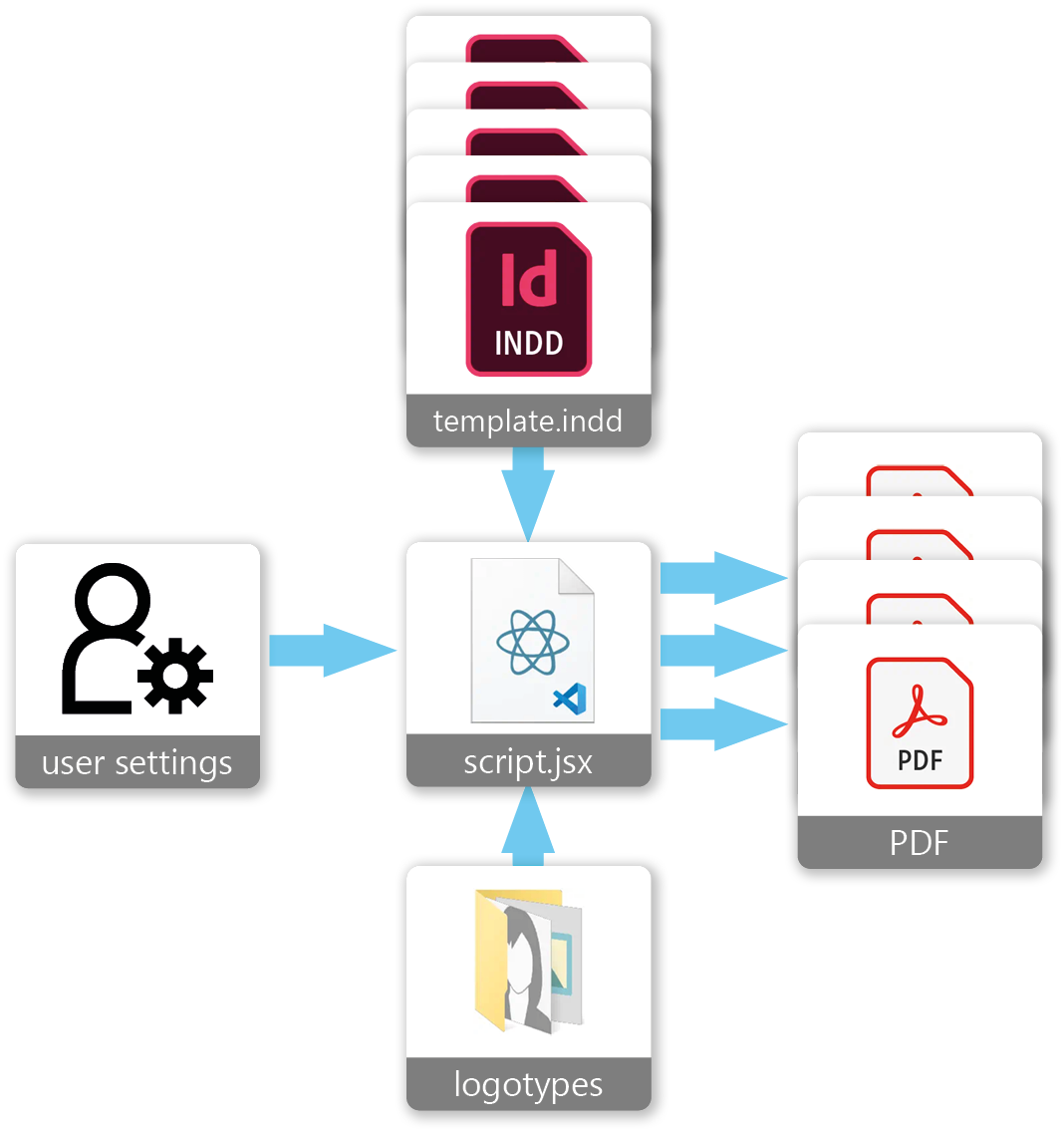
A script that, when run, asks for the location of the input data folder and then generates the e-books.
The input data folder must contain:
- Subfolders with book templates, named in the format [number]_[name] e.g. 123_book 1
-
An "Input" subfolder containing one or more folders with
personalization information for the clients. Each of these
folders:
- Must be named in the format [name]_[language code]_[HEX RGB color code] e.g. Coca Cola_DE_fa7ca3
- Must contain 2 logos in .png format named "dark.png" and "light.png"
Before generating the e-books, the script analyzes all the input data and, in case of errors, creates a list in a txt file asking for corrections.
The script checks the data for:
- Completeness of the templates (presence of .indd, indb files, and any missing links in these files),
- Completeness and correctness of the personalization data,
If there are no errors, the script creates an "Output" subfolder in the specified folder containing the ready e-books.
Delivered:
- Script,
- Installation, usage instructions, and details on how to prepare the data,
- A few folders with example data,

Short description
A simple script that adds the selected element(s) to the template used on the currently edited page.
Features
- Super simple to use
- Adding elements to the master page directly from the page being edited
- Element added to all pages where the template was applied
Problem
Rafał needs a quick way to update templates (master pages) used in the document. He wants to add elements directly from the page he is currently editing, as switching to the master page to do this interrupts his creative process. Additionally, he has to return to the last edited page afterward, which is somewhat cumbersome in long documents.
Input Data
- .indd document
Solution
A small script that, when run, adds the selected element(s) to the template used on the currently edited page, resulting in the element being added to all pages where that template was applied.
Delivered
- Script
Short description
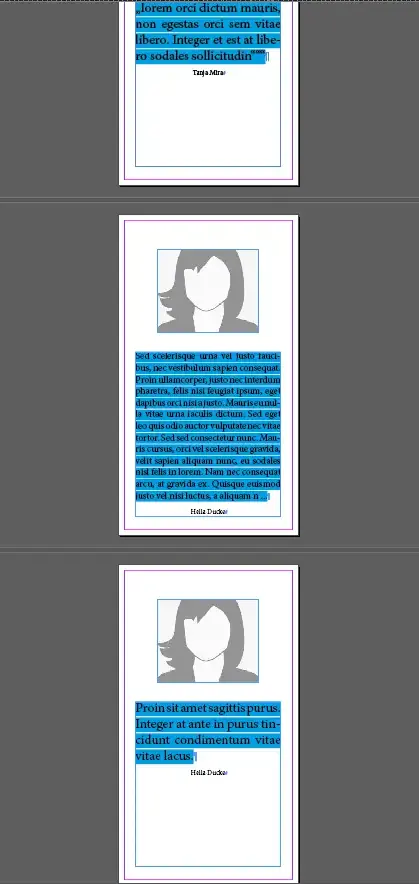
A script that generates name cards with a photo and a short text based on the provided data.
Features
- Automatic text size adjust to fill available space
- Simple to use
- Customizable text formatting
- Customizable card elements
Problem
Johann needs to quickly create 1000+ name cards with a photo and a short text. He cannot use InDesign's built-in "Data Merge" function because the texts to be placed on the cards vary in length, and formatting must be adjusted so the text fits.
Input Data
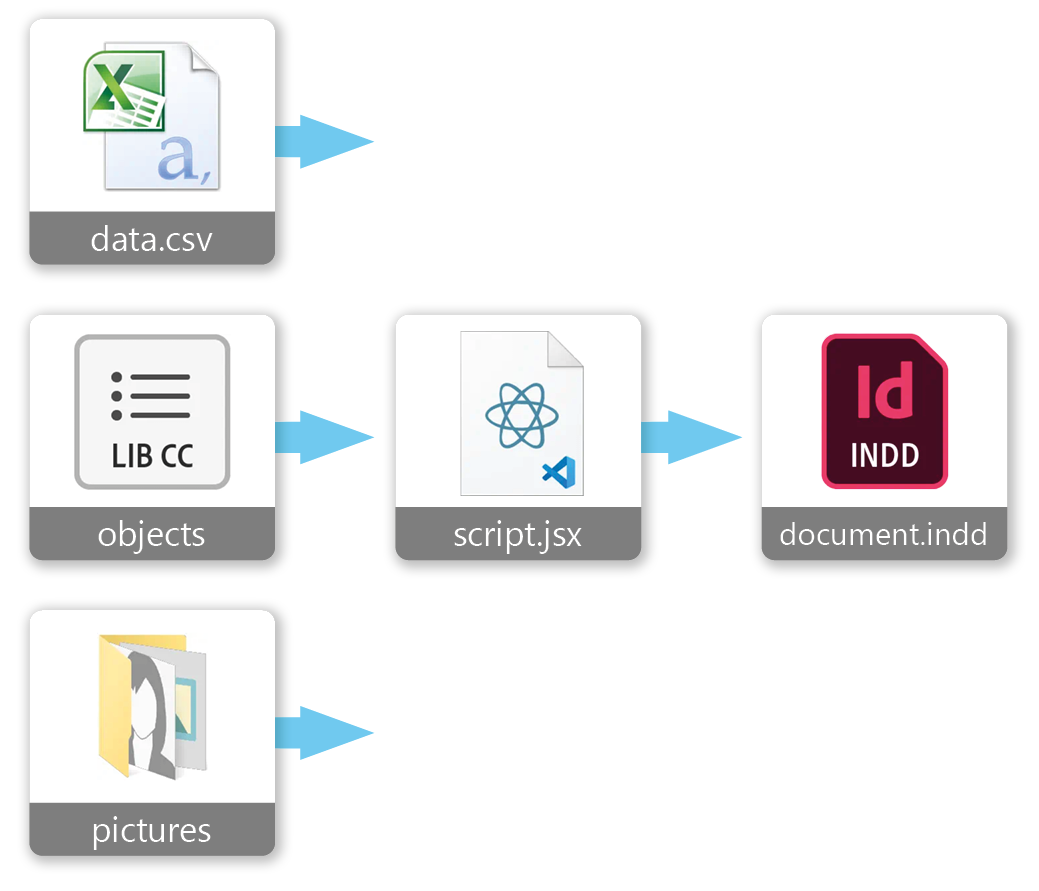
- A folder with photos that are numbered in the file names
- An Excel file specially prepared by Johann containing data in the format: photo_number;description;name_surname
Solution
A script that prompts for the input data location via a simple dialog window and then generates the document. Johann can independently adjust the text formatting by modifying existing styles in the provided template. He can also change the appearance of individual card elements by editing the items in the supplied library.
Delivered:
- Script
- Card template with predefined styles
- A library containing elements used by the script to generate the card

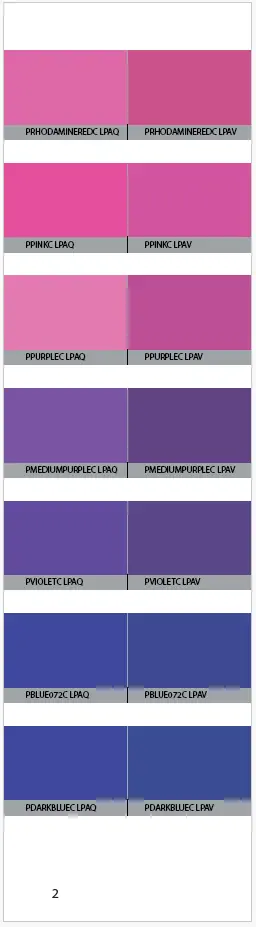
Short description
A script that generates a color swatch picker book from provided data.
Features
- Automatic generation of color swatches
- 500 pages in 10 minutes
- Customizable layout
- Named swatches created in document
- Support for large datasets
- Support for multiple color formats
Problem
Ron needs to create a color swatch book in InDesign. It’s meant to be a 300+ page booklet containing samples of over 2000 colors. While manually creating it is possible, it’s extremely time-consuming and prone to errors. Ron has prepared color information in an XML file, generated in an external specialized application, along with an Excel file that specifies which colors should go on each page.
Input Data
- Book template in .indd file
- XML with color information
- CSV with information on which colors should go on each page
Solution
A script that, when run, generates the color swatch based on the template Ron provided.
Delivered
Completed color swatches in PDF format and .indd files as requested.
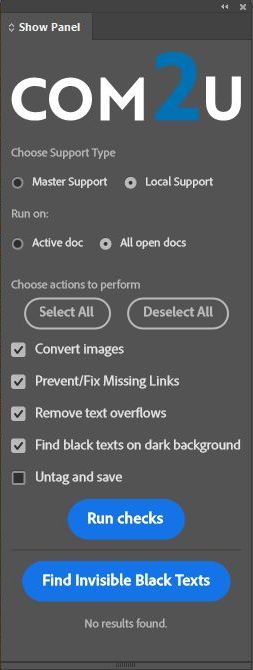

Short description
A UXP plugin for Adobe InDesign that automates the preparation of documents for translation, fixing common errors, and adding necessary elements.
Features
- Integration with InDesign's user interface
- Selection of document type (master/local)
- Selection of processing range (active/all open)
- Selection of processing scope
- Automatic processing of documents
- Logging of errors and information
- Adaptation to the selected color theme
Problem
Benjamin processes about 1000 InDesign documents annually, which are informational leaflets or advertisements. His job is to prepare documents for translation into other languages on an external platform that processes files automatically.
For the documents to be processed correctly, they must meet several requirements. The documents he deals with can be divided into two categories based on their processing method:
- master - source documents
- local - already translated documents that still contain errors. Depending on the type of document, different tasks need to be performed.
Master documents require:
- converting attached images to JPG or PNG format and reducing their resolution if necessary so they don’t take up too much space on the platform
- fixing broken links; additionally, this function renames all files sequentially to prevent broken links during further processing on the platform
- fixing cropped text that doesn’t fit within frames
- adding all colors used in the document to the "Swatches" panel in InDesign, named according to a specified convention
- removing all XML tags in the document and saving it
Local documents additionally require:
- fixing missing diacritical marks and improving the visibility of black text placed on dark backgrounds
Benjamin is a former programmer, and with the help of ChatGPT, he created scripts that significantly ease his workflow. However, he’s not fully satisfied with them. He wants to merge them into one solution, improve their functionality, and extend them with additional features. Ergonomics and a professional appearance are very important to him, as he wants others to use this solution as well.
Input Data
- .indd files
Solution
A UXP plugin with its own panel integrated into InDesign’s user interface. It allows the user to select the type of document(s) being processed (master or local), the range of files to be processed (the active document or all open documents), and the scope of changes to be applied to the selected documents. After clicking the "Run checks" button, the plugin processes the documents.
Any errors or information indicating that a document still requires manual editing are saved to a text file to avoid interrupting the workflow with dialog boxes. Once processing is complete, the plugin displays a message about successful processing or any encountered errors, referring to the text log for details.
In "local" mode, the plugin displays two additional options for possible modifications. One of them is the ability to scan the document for invisible black text.
If found, this information is logged in the text file. The user can then fix such errors in semi-automatic mode. After clicking the "Find Invisible Black Texts" button, the plugin searches for these errors in the currently open document. With "Prev" and "Next" buttons, the user can locate the errors, zoom in, and highlight the text frame. The user can quickly assign one of four pre-defined colors to the text or use the "Select text" button to highlight the text and assign any color from the palette.
Additionally, the plugin adapts its appearance to the currently selected color theme in InDesign.
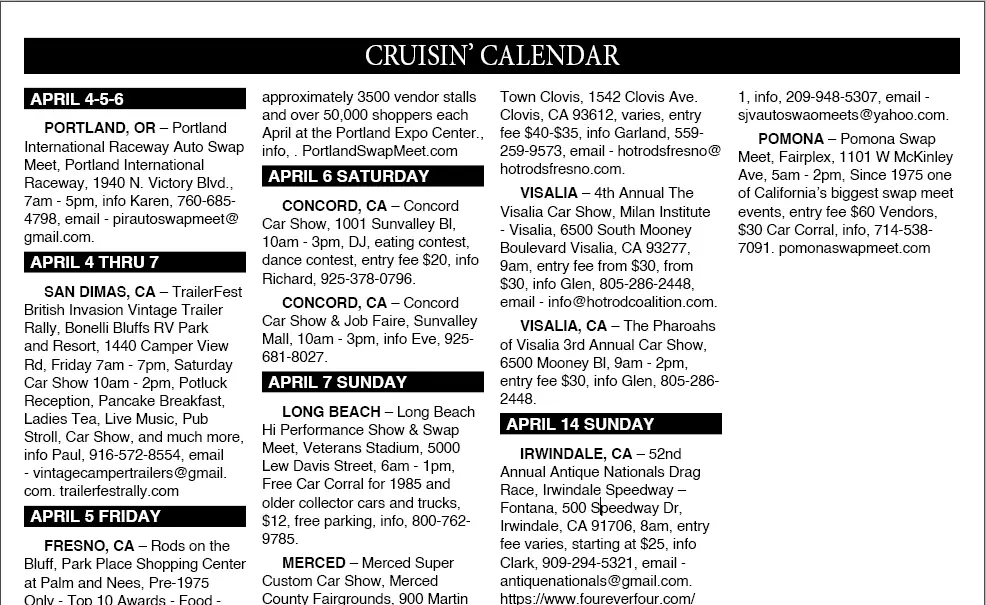
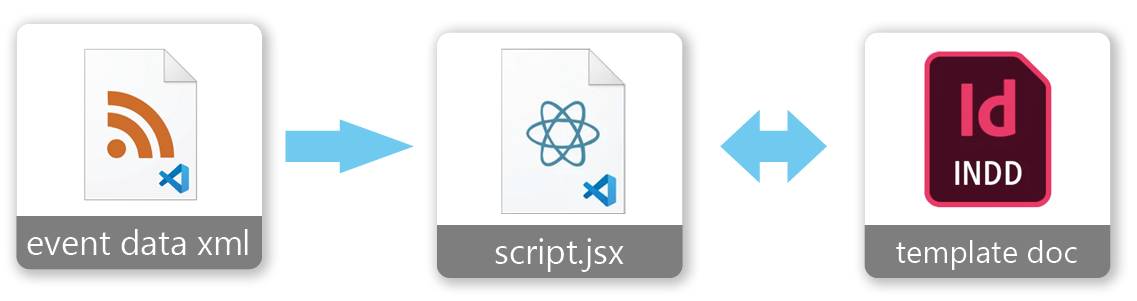
Short description
A script that generates a calendar of local events in InDesign based on the provided data that comes from an external application in the form of an XML file.
Features
- Automatic generation of a calendar of local events
- grouping events with the same date
- removing unnecessary content
Problem
Cruisin' News needs a way to generate their online-published calendar of local events in the form of an InDesign document. Manually creating the document is very time-consuming, tedious, and prone to mistakes. They have data in a database they can use in any way, but before placing it in the template, it must first be processed as per client guidelines (grouping and removing unnecessary content) and then formatted in a strictly defined way that is easy to edit.
Input Data
- An XML file generated from an external application
Solution
A script that, upon running, asks for the location of the XML file with the data and then generates the calendar in InDesign. The script uses a template with predefined text styles that can be easily modified.
Delivered:
- script
- an empty calendar template with all text styles defined in an .indd file

Short description
A small script that merges two PDF documents into one, with pages from each document alternately placed in the new document.
Features
- Alternating pages from two documents
- Rotating pages from one document
- Checking pdf documents for page count inconsistency
Problem
Victoria has two PDF documents (Document A and Document B) and needs to merge them into one, with pages from each document alternately placed in the new document (pages from Document A on even pages in the new document and pages from Document B on odd pages). Additionally, pages from Document A need to be rotated 90 degrees.
Input Data:
2 PDF files with the same number of pages containing information in the same order.
Solution
A short script that asks for the location of both PDF documents and then generates a new InDesign document based on them.
Short description
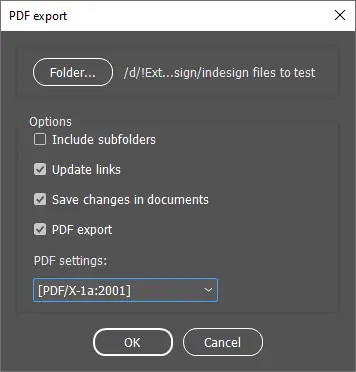
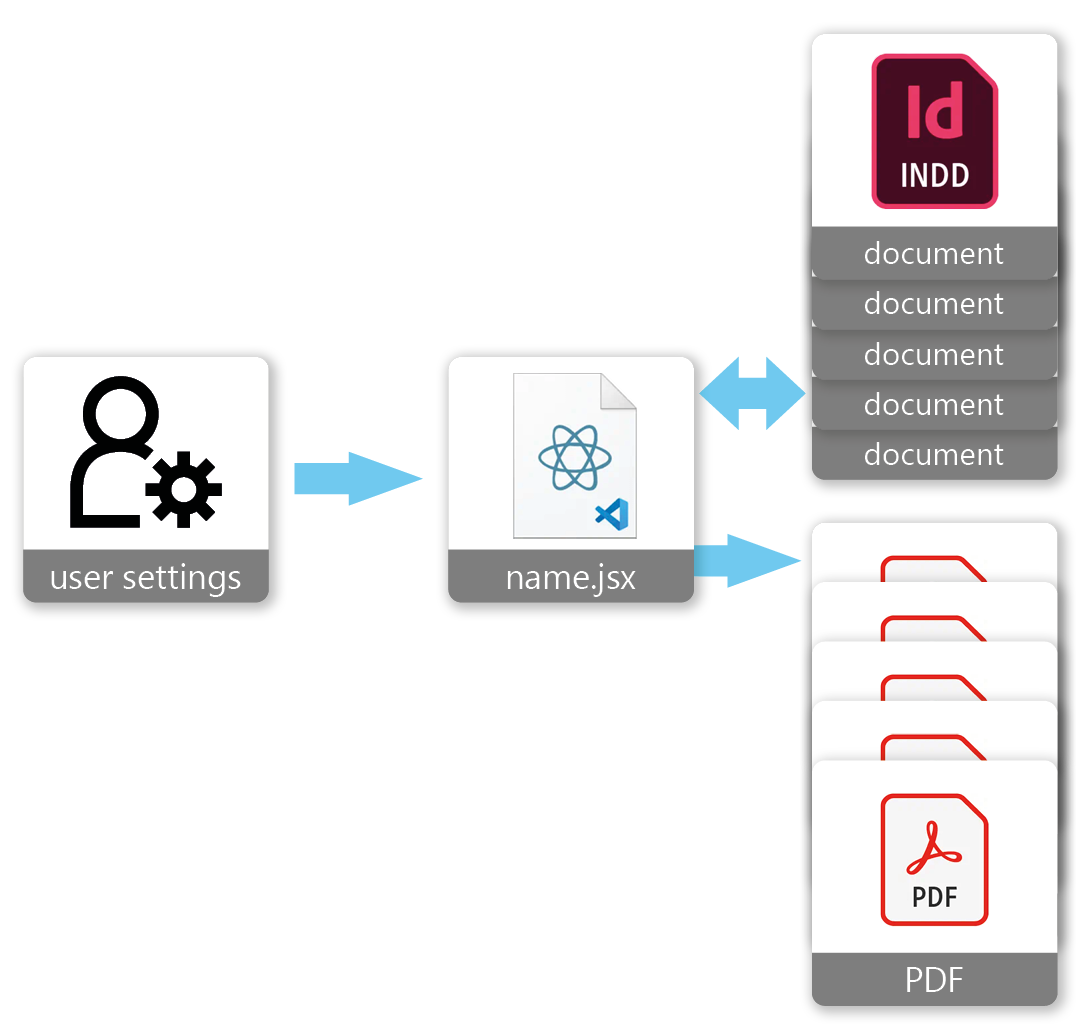
A script that automates the process of updating and exporting InDesign documents to PDF files.
Features
- Able to process multiple files in a folder in one go
- Updating links in the files
- Saving the modified file
- Exporting to PDF
- Processing files in subfolders
- Choosing predefined PDF export settings
Problem
Adam has hundreds of product specifications created as InDesign files. All of them have the same footer with company information, which is created as a separate .indd file and linked in all specifications. After each change in the company information in the footer, he must refresh the link to the footer in each document and regenerate the PDF file. This is a time-consuming and tedious task, and Adam would like to automate it. He wants to control the actions that the script will perform: updating links in the files, saving the modified file, exporting to PDF, and optionally processing files in subfolders. Adam also wants to have the ability to choose predefined PDF export settings.
Input Data
- The entire folder tree containing product specifications in .indd files.
Solution
A script that, when run, displays a dialog window allowing the selection of the folder with specifications and the options regarding the method of operation.
Delivered
- Script
Short description
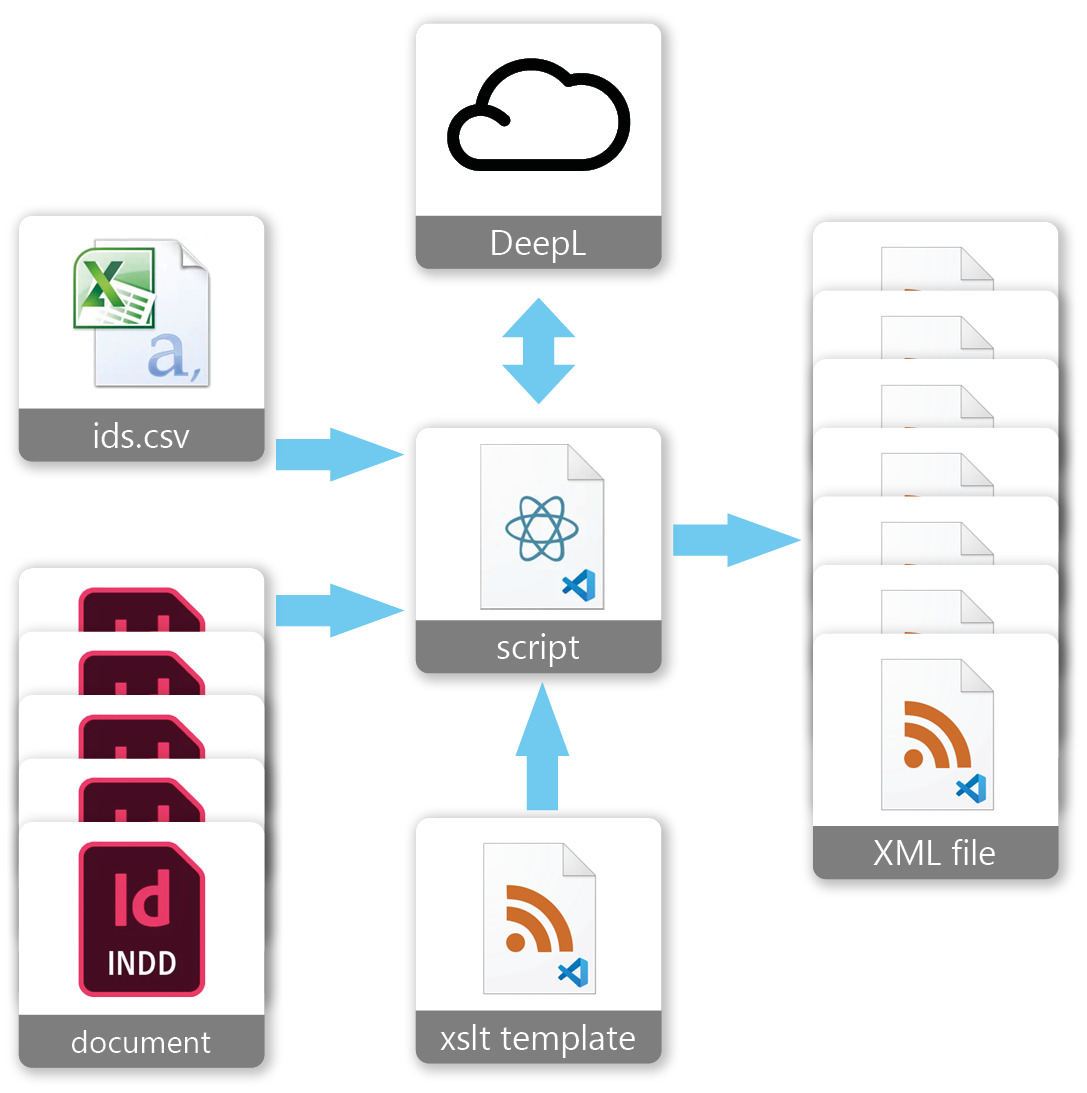
An advanced UXP script for Adobe InDesign that automates the process of extracting data from InDesign documents and converting it to XML files.
Features
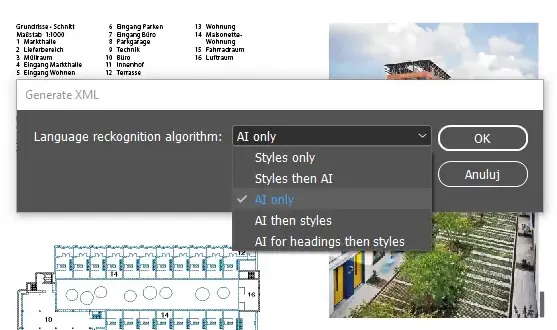
- Selection of processing algorithm
- DeepL integration for language recognition
- Levenshtein Distance algorithm for title ID matching
- Advanced error handling system
- Support for different encoding of special characters
- Support for different document preparation methods
Problem
Stanley has 3,304 articles created in InDesign and needs to move all of them online. He received information that he needs the content contained in these articles in the form of XML files. Additionally, not all information contained in the .indd files should be included in the resulting XML files. He wants to exclude certain texts formatted with specific styles, certain font sizes, or a combination of both. The articles are written in two language versions and must also be separated into individual files by language. Theoretically, language versions should be marked with paragraph styles indicating the language in which they are written, but in practice, this is often not the case, and one cannot rely on this 100%. An additional requirement is to add a strictly defined identifier to the XML file. The identifiers are in a pre-prepared CSV file containing data in the format TITLE;ID. The identifiers need to be assigned based on the title. Here, too, there is a problem because the titles in the CSV file do not always exactly match what is found in the .indd files. Moreover, there is an issue with different encoding of special characters in the CSV and .indd files. Different batches of .indd files are prepared in slightly different ways, and it is also necessary to have the ability to choose how the script should process this data for the best results. Stanley tried to create a script with the help of ChatGPT, but he did not achieve satisfactory results and wasted a lot of time allotted to him by the client to complete the task, which meant that he needs at least some of this XML data "yesterday."
Input Data
- Thousands of .indd files and a CSV file with identifiers
Solution
A sophisticated script that, when run, displays a dialog window allowing the selection of the script's working algorithm and generates XML files based on the files placed in a specified folder and the provided CSV file. To recognize the language in which the content is written, the script uses DeepL artificial intelligence, while to more effectively find the identifier based on the title, the script uses the "Levenshtein Distance" algorithm, correcting the encoding of special characters beforehand. The main engine of the script is the built-in XML data processing mechanism in InDesign, which ensures their correctness and allows the use of XSLT technology to modify how the content is processed. Additionally, the script has an advanced error handling system that informs the user in a clear way about any problems (issues with DeepL connection, file reading, etc.). Stanley received the first simplified version of the script (without error handling, DeepL, and the Levenshtein algorithm) after a few days. However, this version generated XML files that required manual correction. Stanley received support on how to do this and what software to use for the fastest and most satisfactory effect. The script provided by Stanley, generated by ChatGPT, unfortunately turned out to be only somewhat useful, and attempts to fix it caused further unnecessary delays.
Delivered
- UXP script
- XSLT templates defining XML file processing for both language versions
- Extensive support regarding the entire data processing process and troubleshooting
Have questions?
Take a look at FAQ. I will answer any other questions in 24h.